Users
Under Users you manage the users set up in ErControl and their master data. The page is opened via the entry of the same name in the navigation bar of the main window, right below Profiles.
Note
This page is only for managing user data. Who is currently logged in (and whose trainings/profiles are shown in Training Overview and Profiles) is determined on the login screen at program start, not here. The first user of a new database is created via a dialog of its own with the same fields, see First start: database and first user; there is no automatically created administrator account.
Layout
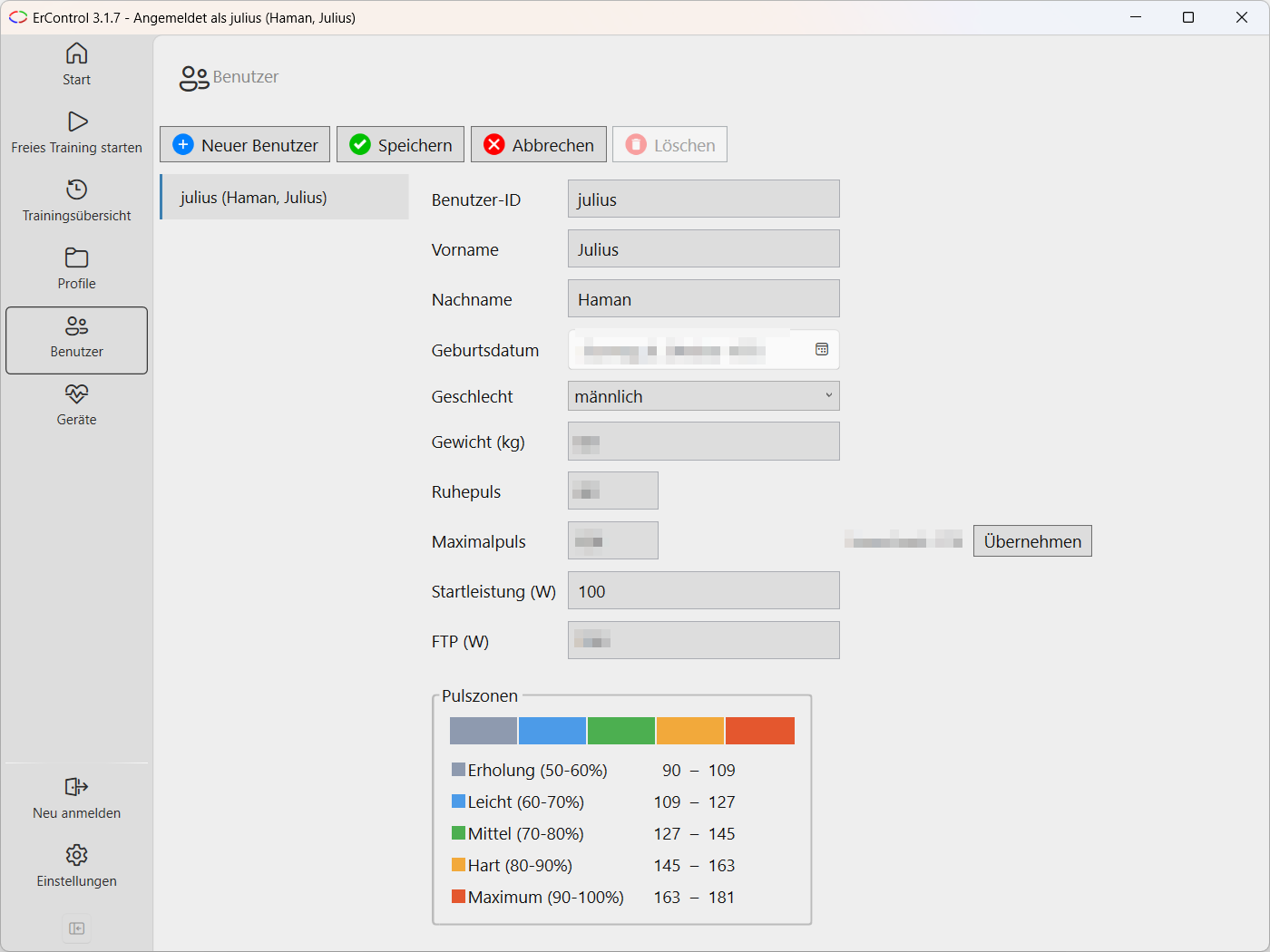
User management: user list on the left, master data and heart rate zones on the right.
On the left, a list of all users.
On the right, the master data of the selected user: user ID, first name, last name, date of birth, sex, weight, resting heart rate, maximum heart rate, starting power, and FTP.
A Heart Rate Zones field shows the five ranges calculated from the maximum heart rate as a color bar with a legend, in beats per minute, see Heart rate zones; the values update automatically as soon as date of birth, sex, weight, or maximum heart rate are changed.
If no maximum heart rate is entered, ErControl suggests a value based on age, weight, and sex (“calculated: …”); Apply copies this suggestion into the maximum heart rate field.
The FTP (functional threshold power, in watts) is optional: the power you can sustain for about an hour, e.g. 95 % of the average power of a 20-minute test. It converts power profiles in % FTP into watts (see Profiles → Power in watts or % FTP). When a training starts, ErControl saves the current FTP with the training.
Heart rate zones
ErControl divides the heart rate into five zones of equal width, 10 % of the maximum heart rate each. Every zone has a fixed color that recurs throughout ErControl - in user management, in the heart rate tile of the value bar, as background bands in the charts and in the heart rate zone pie chart of the Training Detail. The colors are the same in the light and dark appearance.
Color |
Zone |
Share of maximum heart rate |
|---|---|---|
1 – Recovery |
up to 60 % |
|
2 – Light |
60–70 % |
|
3 – Medium |
70–80 % |
|
4 – Hard |
80–90 % |
|
5 – Maximum |
from 90 % |
The colors run from cold to hot: gray-blue for Recovery, blue for Light, green for Medium, orange for Hard and red for Maximum. The Recovery zone covers everything below 60 % of the maximum heart rate (labeled 50–60 % in the legend), the Maximum zone everything from 90 %.
The resting heart rate is recorded together with the master data. It does not yet affect the calculation of the zones, but is saved with every training (see below) and is the basis for a later, optional calculation method.
Note
Zones of old trainings stay stable. When a training starts, ErControl saves the maximum and resting heart rate valid at that time in the training. The heart rate zones of a training in the Training Overview and the Training Detail are calculated with these saved values - if your maximum heart rate changes later, older trainings remain unchanged. For trainings recorded before this feature existed, the value from the user profile is used as an approximation.
Actions
New User – creates a new user, who immediately appears in the list and can be edited.
Save – applies changes to the selected user’s master data.
Cancel – discards unsaved changes.
Delete – permanently deletes the selected user after confirmation. The currently logged-in user, as well as users who have already completed training sessions, cannot be deleted.